
What to automate next, when you already have AI running
The three numbers to write down before you build anything, where the expensive manual work hides, and how to tell six months later that it still works.
Almost every company we talk to has AI running somewhere. Far fewer can say what it is doing, what it costs, or which process should come next. The question has moved from whether to adopt AI to how to choose the next thing to build. This guide covers how to make that choice with measurement instead of opinion, and how to tell, six months later, that what you built still works.
Who wrote this
The Automation Partner builds custom systems on monday.com and Make, so we have an interest in you concluding that an operations layer is worth it. To offset that: there is a section on when you do not need any of this, and the method below works whether you build it with us, with another provider, or on your own.
We attended Waves ’26 in Prague on 19 and 20 October 2026 as a Make partner. The research and product detail attributed to Make below comes from those sessions and from Make’s published material. Third-party products change often. Verify before you decide.
How the next process actually gets picked
In most companies the automation backlog is set by one of three things: whoever complained loudest at the last management meeting, the notes from a workshop held six months ago, or a vendor demo that made a particular process look easy.
None of those is evidence. They are all proxies for evidence, and they share the same weakness: they surface the work that is visible, not the work that is expensive. The two are rarely the same.
Make put this directly when it introduced Process Intelligence at Waves ’26 in October 2026, describing the problem as priorities still being set by workshop notes and by whoever complains loudest. The company’s answer is a product. The underlying diagnosis holds regardless of what you buy.
We see the same pattern from the other side of the table. In diagnostic calls with operations and administration teams across construction, insurance, logistics, agriculture and professional services, the process the client names first is almost never the one that turns out to consume the most hours.
Why productivity dips before it rises
There is a second reason to measure before you build, and it is less intuitive.
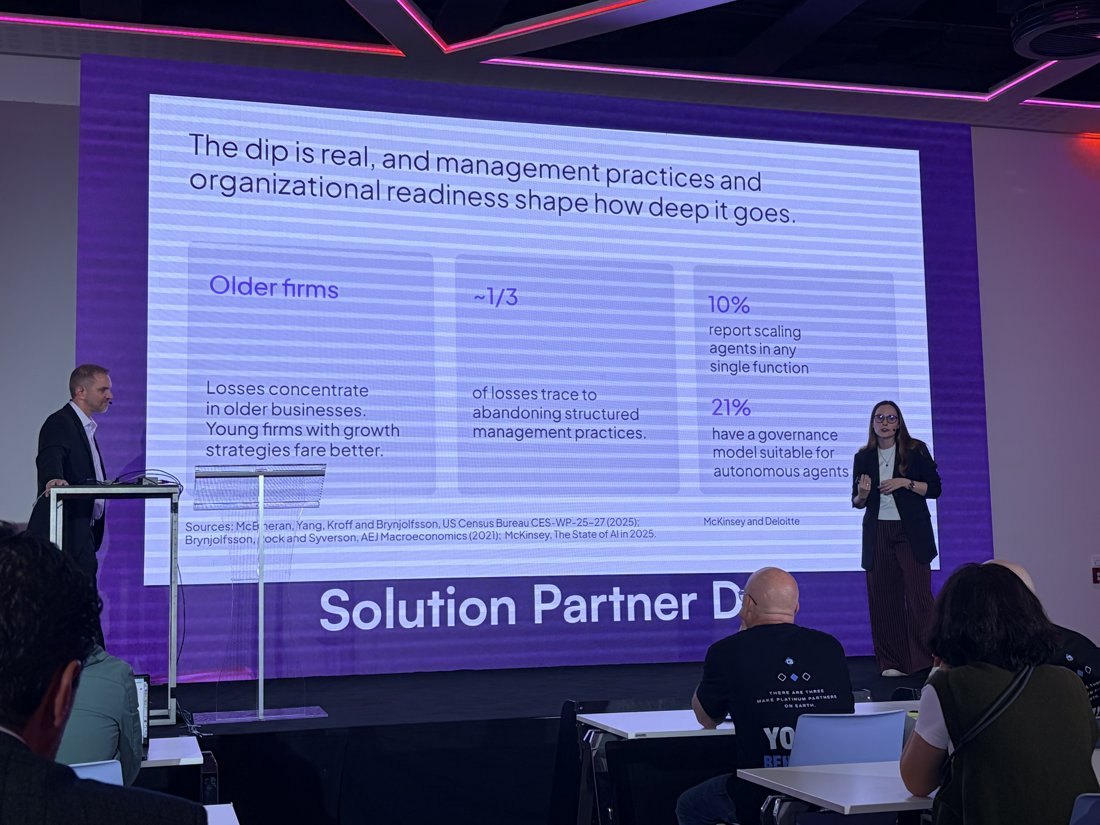
In the session we sat in on at Waves ’26, Make walked through the economics of AI adoption using external research rather than vendor claims. One finding is worth sitting with: the productivity curve has the shape of a J. It drops before it climbs.
The drop concentrates in older businesses, and roughly a third of those losses trace back to abandoning structured management practices. That evidence comes from work by McElheran, Yang, Kroff and Brynjolfsson for the US Census Bureau, and from Brynjolfsson, Rock and Syverson in the AEJ Macroeconomics paper on the productivity J-curve.
The reason is structural rather than technical: those companies introduce AI inside management practices and process designs built for a different era, so the new capability has to work through the old sequence. It is the equivalent of swapping steam engines for electric motors while keeping the original assembly line. The motor is better. The line is still the line.
The practical consequence for anyone choosing a next process: the return comes from redesigning the process and automating the redesigned version. Automating the current version faithfully is the fastest route into the dip and the slowest route out of it.
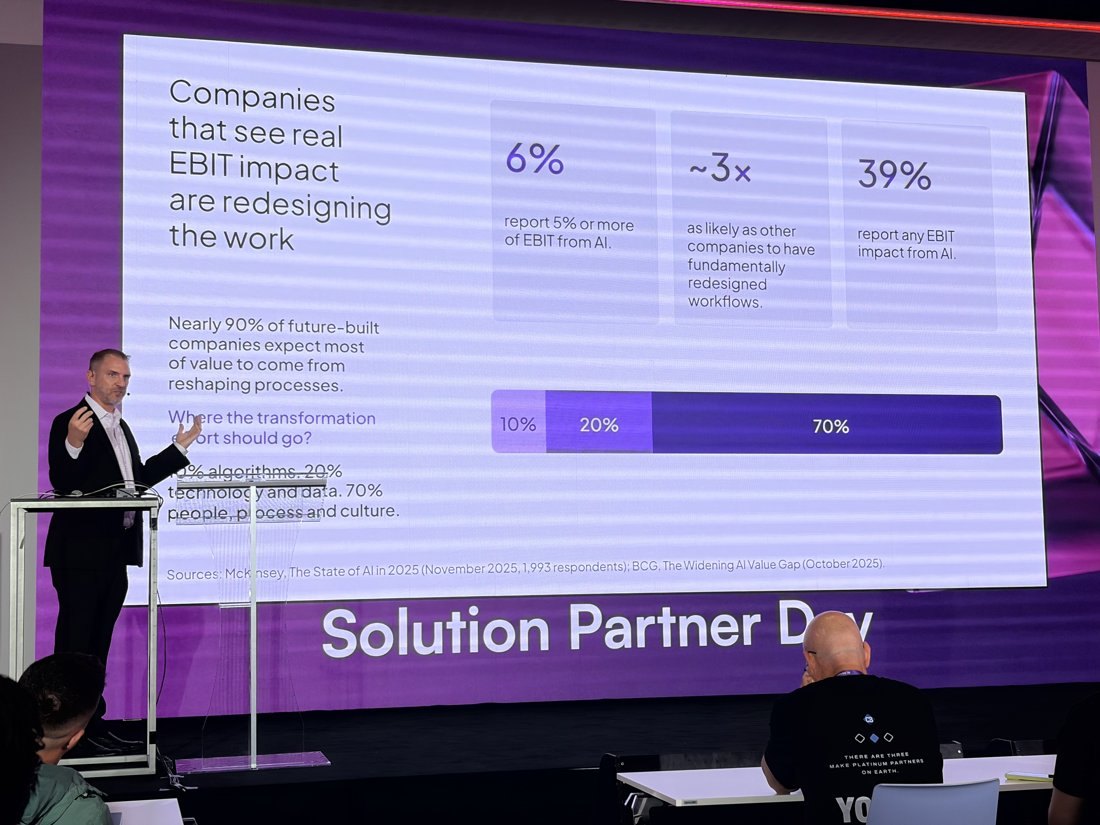
The same session put numbers on who actually gets a return, drawing on McKinsey’s State of AI in 2025 and BCG’s Widening AI Value Gap:
The companies seeing real impact are the ones that redesigned the work, not the ones that bought more tooling. The same sources split the transformation effort roughly 10 percent on algorithms, 20 percent on technology and data, and 70 percent on people, process and culture. That ratio is a useful sanity check on any automation plan. If your plan is 90 percent tooling, the plan is missing the part that decides the outcome.
The three numbers to write down before you build anything
This is the part that costs nothing and that almost everyone skips.
Before a single scenario is built, three numbers go on the record. They take an afternoon to gather and they do two jobs at once: they tell you whether the process is worth automating, and they are the only way to prove afterwards what the project returned.
| Number | How to get it | What it decides |
|---|---|---|
| Hours per week, per person | Ask the person who runs the task, not their manager. Ask for a normal week and a peak week separately. | The size of the prize. Also the single number you will be asked for when someone questions the investment. |
| Share of cases that go to exception | Count one full cycle. How many items needed a human to decide something, and who decided it. | How much of the process can actually be automated, and which steps need judgment rather than a rule. |
| Closing day, actual versus intended | The date the process finished last month, against the date it was supposed to finish. | Whether the problem is time spent or time elapsed. These call for different solutions. |
The second number is the one people struggle with
Hours are easy to estimate and the closing date is a fact. The exception rate requires someone to count for a full cycle, which is why it is usually missing. It is also the number that predicts most accurately how the project will go, because the exception path is where automations break and where the real cost sits.
A related failure worth naming, because it is ours. We have delivered systems where the result was clearly good and we could not state the hours returned, because nobody recorded the hours consumed before the system existed. The work was right. The proof was missing. Baselines are cheap before a project and impossible to reconstruct after one.
Where the expensive manual work hides
Ask a team to describe how a process runs and you will get the version in the manual. The version that actually runs has an extra step the manual does not mention, and that step is usually where the hours go.
In administrative processes it takes a specific and very recognisable shape: a file the system does not know about.
It lives in a shared drive. One person maintains it. It holds the bank movements on one side and, in a column added by hand, the receipt numbers that correspond to each one. Sometimes four or five numbers in a single cell, because one transfer covered five invoices. That file is what lets the month close in a day instead of a week.
It appears in the same place every time: where the system ends and judgment begins. The company’s management system cross-checks amount and date, which resolves the easy cases. When a customer pays five invoices with one transfer, or pays three days after the document date, amount and date stop being enough. A person who knows the customers fills the gap, and records the result somewhere the system cannot see.
Why this matters for choosing
Work of this kind leaves no trace in any log, dashboard or report. It is invisible to every measurement the company already has, which is exactly why it rarely reaches the automation backlog. The company usually discovers it the first time that person takes two weeks off.
The practical move is to ask for the artefact rather than the description. In a diagnostic call, the most useful question is not how the process works. It is: can you show me the file you actually use? Everything that matters is visible in it within two minutes, including the columns nobody mentioned.
Task mining and process mining: what changed in 2026
Until recently, finding that hidden work meant sitting with people and watching. In October 2026, Make introduced Process Intelligence, built on Celonis technology, which instruments it. Both capabilities are on a waitlist at the time of writing rather than generally available.
| Task mining | Process mining | |
|---|---|---|
| What it looks at | How people work on the desktop and in the browser | Event data inside your systems of record |
| What it answers | Where your team’s time actually goes | Where a process stalls, loops or leaks value |
| Finds the hidden file | Yes | No |
| Shows the end-to-end path | No | Yes |
| Output | Tasks ranked by repetition and time consumed | A live map across systems, people and agents |
Task mining is the more interesting of the two for a mid-sized company, because it targets precisely the work that leaves no trace. Make describes it as grouping desktop and browser interactions into tasks and subtasks, so the next thing you automate is the one that matters rather than the one with the loudest complaint. Privacy controls are configurable: which applications are in scope, how much is captured, and employees can see that it is running.
You do not need the tool to get the answer
Mining software replaces a manual exercise. It does not make possible something that was impossible before. A company of 20 to 500 people can reach the same conclusion in two weeks: time the task with the people who run it, count exceptions across one full cycle, and record the real closing date. The tooling earns its cost when the process crosses many systems and departments, or when you need evidence nobody in the room can argue with.
Ranking candidates without guessing
Once the three numbers exist for each candidate, ranking is mechanical. Two axes: hours consumed, and how much judgment each step requires.
| Profile | Hours | Judgment required | Verdict |
|---|---|---|---|
| Data moved between two systems by hand | High | Low | START HERE |
| Documents read and keyed in manually | High | Medium | SECOND |
| Matching, reconciling, cross-checking | High | High | SECOND |
| Chasing people for information | Medium | Low | QUICK WIN |
| Deciding commercial terms or exceptions | Low | High | LEAVE ALONE |
| Anything a customer perceives directly | Any | Any | LEAVE ALONE |
The last row is a design rule rather than an economic one, and it is worth stating plainly because the market mostly argues the opposite. The parts of your operation a customer perceives are the parts a competitor cannot copy, because everyone will have access to the same models. Automate what sits behind the counter and the time comes back to the people who handle the relationship.
We applied that rule explicitly on an insurance brokerage project: everything supporting the advisor was automated, and the contact with the insured was left untouched by design.
Fixed rule or AI agent: decide step by step
The common framing is whether a process should be automated or given to an agent. That framing produces bad answers, because almost no useful process is uniformly one or the other.
Decide per step. A step with a stable rule and a predictable input runs as a fixed automation: same input, same output, every time, at a lower running cost. A step that needs context, comparison or interpretation is where a model earns its place.
| Step | What it needs | How to build it |
|---|---|---|
| Pick up a document from an inbox or portal | A trigger and a connection | Fixed automation |
| Read the document and extract fields | Interpretation across varied layouts | Model |
| Check the tax ID matches a supplier on file | An exact comparison | Fixed automation |
| Match one payment against several invoices | Context and reasoning over alternatives | Model |
| Post the record to the system | A known API call | Fixed automation |
| Decide an unresolved or ambiguous case | Accountability | A person |
This is also where the economics live. Model steps cost more per run than deterministic ones, so a design that routes everything through a model is both slower and more expensive than one that reserves the model for the steps that need it.
Set the exception target before you build, not after
Agree up front what share of cases the system should resolve on its own, and what happens to the rest. Eighty-five percent resolved automatically with the remainder flagged as exceptions with notes is a good outcome in reconciliation work, and a far better one than a system that claims a hundred percent and quietly produces wrong matches. A false positive costs more than an unresolved case, because an unresolved case gets looked at and a wrong match does not.
Proving it still works at month six
Most monitoring answers one question: did it break. That question misses the two failure modes that cost the most.
The first is work that runs correctly and expensively. We looked at a scenario that had run for months without a single error. The output was right. Nobody had a complaint. Then daily consumption multiplied by eighty from one day to the next.
The diagnosis: the scenario had been designed to pull a hundred records on every execution to keep two, filtering at the end rather than at the start. At low volume that is waste nobody notices. When volume changed, it became 95 percent of everything the organisation consumed. No error was ever raised, because technically nothing was wrong. It was found by looking at consumption, not at errors.
The second is work that runs correctly and gets ignored. A report that lands on time in a channel nobody opens is a cost with no return, and no monitoring system will ever flag it.
| Check | How often | What a bad answer looks like |
|---|---|---|
| Consumption by scenario, highest to lowest | Monthly | One scenario taking more than half the total |
| Exception rate against the baseline | Monthly | Climbing without an obvious cause |
| Is the output still used | Quarterly | Nobody can say when they last opened it |
| Errors with a named owner and a resolution note | Continuous | Alerts that nobody acknowledged |
| Cost projected at five times current volume | Before each peak season | The plan would be consumed in days |
The last row deserves emphasis. Automation cost scales with process volume rather than with your revenue. A scenario that is comfortable in a quiet month can consume an entire monthly plan in under a day during peak season. That calculation belongs in the design review, not in the invoice.
This is the practical content of what Make called the glass box at Waves ’26: the argument that if agents are going to execute business-critical work, every action should be visible, permissioned and reversible. The concept is sound and the direction is right. It is also worth noting that none of the five checks above requires a new product. They require someone whose job it is to run them.
Governance at 50 people
Governance is where most mid-market guidance becomes unusable, because it is written for organisations with a CISO, a data steward and an audit function.
Frameworks are worth knowing by name. NIST AI RMF is a voluntary US reference, ISO/IEC 42001 is an international certification standard for AI management systems, and the EU AI Act sorts systems into risk tiers with legal obligations attached. If you sell into Europe or into regulated industries, those will reach you eventually.
At 50 people, none of them is the starting point. Four written answers are.
Four answers per automation or agent
One page per item. If you cannot fill it in, that is the finding.
Who owns it
A named person, not a department. The one who gets called when the output looks wrong, and who decides whether it is wrong.
What it is allowed to reach
Which systems and which actions inside them. Read access to an inbox is a different grant from write access to an accounting system, and they should be granted separately.
What requires a person to approve
Money leaving the company, anything sent to a customer, and anything that cannot be undone. Those three cover most of the real risk at this size.
Who can switch it off
And whether they know they can. An off switch that only the provider can reach is not an off switch.
Add one more thing: a register listing every automation and agent in use, including the ones a team set up without telling anyone. You cannot govern what nobody has counted, and at this size the count is usually higher than leadership expects.
Ask this before signing with any provider, including us
Whose name is the platform account in, and can you export everything and move it if you change provider? Flows do not port between platforms, so changing tools means rebuilding rather than migrating. What you can control is whether the dependency is on a piece of software or on a person who left.
A 90-day plan
One process at a time, with a measurable result before the second one starts.
From baseline to a second process
Timings assume a company of 20 to 500 people and one process at a time.
Baseline and selection
Gather the three numbers for three to five candidate processes. Ask to see the real files, not the descriptions. Pick one: highest hours, lowest judgment, and a named owner who wants it to happen.
Redesign, then design the build
Redesign the process before automating it, because automating the current sequence faithfully is what produces the dip. Document the target architecture and have the people who run the process sign off before construction starts.
Build, test against history, go live
Test against cases from previous months, where the right answer is already known. Agree the exception target before go-live. Expect the team to check every case for the first two cycles, which is correct behaviour rather than resistance.
Measure against the baseline, then pick the second
Compare the three numbers against where you started and write the result down. Put the five observability checks on a schedule with an owner. Only then choose the next process.
In a published case with an agricultural company operating across multiple farms, running this sequence on information flow and work orders produced the following against the starting point:
In a construction group in Chile, applying the same approach to purchase documentation put 300 to 500 documents per month through automatic processing, with AI agents reading and classifying them and three-way matching handled by the system instead of by hand.
When you do not need any of this
Three situations where the honest answer is to wait, and we say so in diagnostic calls.
The process runs a handful of times a month. Build cost is roughly flat regardless of volume. At low frequency, the arithmetic does not work and will not work next year either.
The process is about to change. If the company is mid-way through replacing the system the process runs on, or the regulation behind it is being rewritten, automating the current version buys a rebuild. Wait for the new version.
Nobody owns it. A process without a named owner who wants the outcome does not get adopted, regardless of how well it is built. This is the most common reason projects at this size disappoint, and it has nothing to do with technology. It maps directly onto the 70 percent that the adoption research put on people, process and culture.
Where should you start at your company?
Take the tech maturity assessment and get a personalized report with your opportunities and where it makes sense to begin.
Take the assessmentTell us how your operation runs and we will tell you what to automate first
Thirty minutes on your real process. If the right call is to wait, or to use something you already own, we will say so and explain why. It saves both of us the pitch.
Book a free auditOr see how we work
Frequently asked questions
How do I decide what to automate next?
Decide with measurement rather than opinion. Before choosing a process, write down three numbers: hours per week per person spent on the task, the share of cases that go to exception and who resolves them, and the day the process closes today versus the day it should close.
Rank candidates by hours consumed against how much judgment each step needs. The process with the most hours and the least judgment goes first. Record those numbers before any build starts, because without a baseline you cannot prove afterwards what the project returned.
What is task mining and how is it different from process mining?
Task mining records how people work on the desktop and in the browser, then groups those interactions into tasks so you can see which ones repeat most and how long each takes. It surfaces manual work that leaves no trace in any system log.
Process mining builds a live map of how work runs inside your systems of record, including how agents run, using event data. Task mining answers where your team’s time goes. Process mining answers where a process stalls, loops or leaks value.
Do I need task mining software to find what to automate?
No. Task mining replaces a manual exercise, it does not create one that was impossible before. A team of 20 to 500 people can get the same answer in two weeks by timing the task with the people who run it, counting exceptions for one full cycle and recording the actual close date.
Mining tools earn their cost when the process spans many systems and departments, or when you need evidence that nobody in the room can dispute.
Should I use an AI agent or a fixed automation?
Decide step by step rather than for the whole process. A step with a stable rule and a predictable input should run as a fixed automation, because it gives the same output every time and costs less to run.
A step that needs context, comparison or interpretation, such as reading an invoice or matching a payment to several invoices, is where a model earns its place. Most useful processes mix both: deterministic where the rule is clear, model-based where judgment is required, and a person on the exceptions.
How do I know if an automation is still working six months later?
Error monitoring alone will not tell you. An automation can run without a single error and still be wrong or expensive, because the output looks correct and the logs look clean.
Check three things on a schedule: consumption per scenario ordered highest to lowest, the share of cases going to exception compared with the baseline, and whether the people meant to use the output still use it. A single scenario taking more than half of total consumption is worth opening even when nothing has failed.
What does AI governance mean for a company of 50 people?
At that size governance means four written answers rather than a certification programme: who owns each automation or agent, which systems it is allowed to reach, which decisions require a person to approve, and who can switch it off.
Add a register listing every automation and agent in use, including the ones a team set up without asking. Frameworks such as NIST AI RMF and ISO/IEC 42001 are worth knowing, but a mid-sized company gets most of the benefit from the register and the four answers.
Why does productivity sometimes drop after adopting AI?
Because the gain comes from redesigning the process, not from adding the tool to it. Research on the productivity J-curve, from Brynjolfsson, Rock and Syverson and from US Census Bureau work by McElheran, Yang, Kroff and Brynjolfsson, shows the curve dips before it rises, with the dip concentrating in older businesses that introduce AI inside processes built for a different era.
The way to shorten the dip is to redesign the process first and automate the redesigned version, rather than automating the current one.
How long does it take to automate a back office process?
A single well-scoped process in a mid-sized company typically takes one to three weeks to build and test, and about 90 days to reach a state where several processes run reliably and the team trusts the output.
The build is rarely the long part. Agreeing what the process actually is, and getting the people who run it to validate the design before construction starts, is what sets the pace.
What should an automation cost in a mid-sized company?
Costs split into three lines that are worth quoting separately: a one-off implementation fee for the build, a monthly platform subscription that scales with volume, and an optional monthly support fee for monitoring and adjustments.
The platform line is the one most proposals get wrong, because automation platforms charge by volume. Run the count on a real process before signing anything: take a process you already have, count its steps, and apply each platform’s counting model to it.
Who should own automation inside the company?
Ownership works best when it sits with the area that runs the process, with a single named person accountable for each automation, rather than centralised in IT. IT sets the rules on access and security. The operations or administration lead decides what the process should do and signs off that the output is correct.
Research from McKinsey and BCG puts roughly 70 percent of transformation effort on people, process and culture, against 20 percent on technology and data and 10 percent on algorithms, which is a useful argument when the conversation drifts toward tooling.